
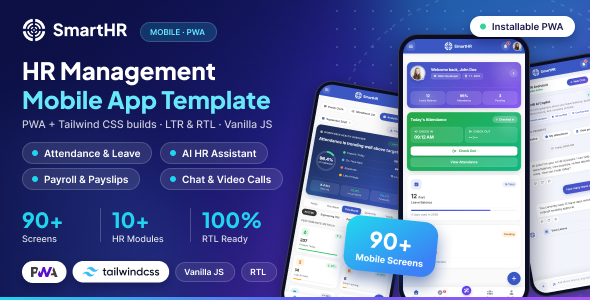
The Tailwind build reuses the same mobile-first SmartHR UI as the PWA template as its visual source of truth, and layers a Tailwind CSS v4 design-token system, utility classes and Preline UI component behaviour on top of it. It is assembled with Vite 6, and every one of its 90+ pages (dashboard, employees, attendance, leave, payroll, projects, clients, chat, auth, settings) is composed from a small set of reusable HTML partials rather than being duplicated per page.
Because the compiled PWA stylesheet is kept as the unlayered base, the two templates stay visually identical while the Tailwind build gives you utility-first classes, design tokens and a faster iteration workflow (hot module reload via yarn run dev) on top.
- Tailwind CSS v4
@themedesign tokens - Vite 6 dev server with instant hot reload
- Reusable HTML partials (header, sidebar, topbar, footer, scripts)
- Preline UI component behaviour
- Automatic third-party library copying on
yarn install - Multi-page build (90+ pre-built screens)
- Employee, Attendance, Leave & Payroll management modules
- Projects, Tasks, Clients & Invoicing/Estimates
- Chat, Calls, AI HR Assistant & Team Directory
- Performance Appraisal, Assets, Org Chart & Self-Service Portal
- Installable PWA (manifest + service worker carried over)
- RTL variant (
template-rtl) - Fully Responsive, mobile-first layout
Project Overview
The Tailwind build lives alongside the PWA template inside the mobile/ root, as its own Vite project with a template and RTL template-rtl variant.
smarthr/
└── mobile/
    └── tailwind/
        ├── template/
        │   ├── src/
        │   │   ├── assets/
        │   │   │   ├── css/          → style.css (Tailwind @theme + compiled PWA styles)
        │   │   │   ├── fonts/
        │   │   │   ├── images/
        │   │   │   ├── js/
        │   │   │   ├── libs/         → auto-copied from node_modules (postinstall)
        │   │   │   └── plugins/
        │   │   ├── partials/
        │   │   │   ├── components/
        │   │   │   ├── header.html
        │   │   │   ├── sidebar.html
        │   │   │   ├── topbar.html
        │   │   │   ├── footer.html
        │   │   │   ├── script.html
        │   │   │   └── title-meta.html
        │   │   ├── index.html, clients.html, ... (40+ pages)
        │   │   ├── manifest.json / pwa-manifest.json
        │   │   ├── service-worker.js / pwa-sw.js
        │   │   └── server.js
        │   ├── plugins/
        │   │   └── vite-plugin-file-include.js
        │   ├── dist/                  → production build output
        │   ├── package.json
        │   ├── postcss.config.js
        │   └── vite.config.js
        │
        └── template-rtl/
            └── (same structure, RTL variant)
Every page is assembled at dev/build time from shared partials, so header, sidebar, topbar and footer markup only has to change in one place. This is handled by a small custom Vite plugin, plugins/vite-plugin-file-include.js, which resolves @@include(...) directives recursively.
<head>
	<!-- meta tags -->
	@@include('partials/header.html', {"page": "index"})
</head>

<body>
	@@include('partials/sidebar.html', {"page": "index"})

	<div class="min-h-screen pb-24">
		@@include('partials/topbar.html', {"page": "index"})
		<!-- page content -->
	</div>

	@@include('partials/bottom-nav.html', {"page": "index"})
	@@include('partials/script.html', {"page": "index"})
</body>
Each @@include call takes a JSON context object (e.g. {"page": "index"}) so a shared partial like sidebar.html can mark the current page as active. Edit a partial once inside src/partials/ and every page that includes it picks up the change on the next save.
package.json Scripts
Run these from inside tailwind/template/.
yarn run dev        # vite - starts the dev server on http://localhost:3000
yarn run build      # vite build - outputs the production build to ../dist
yarn run preview    # vite preview - serves the build on http://localhost:4173
A postinstall script runs automatically after yarn install. It scans node_modules for packages with a dist (or scoped src) folder and copies their compiled assets into src/assets/libs/, so pages can reference third-party CSS/JS with plain <link>/<script> tags. scripts/build-style.cjs regenerates the compiled PWA styles embedded at the top of src/assets/css/style.css from build/pwa-style-source.css, so the Tailwind build stays visually in sync whenever the PWA template's SCSS changes.
Prerequisites
Node.js Installation
Before installing dependencies, ensure you have Node.js 18+ installed on your system:
https://nodejs.org/en/download/
Installation Steps
Open the Template Folder
After downloading, extract the
Smarthr package and open a terminal inside mobile/tailwind/template.
Install Dependencies
Install the yarn packages. This also triggers the postinstall step that copies vendor libraries into src/assets/libs/.
yarn installRun the Dev Server
Start Vite's dev server with hot reload:
yarn run devOpen http://localhost:3000 in your browser.
Build for Production
Generate the optimized, static build:
yarn run buildThe output is written to tailwind/dist/. Preview it locally with yarn run preview (http://localhost:4173) before deploying.
The default font is Plus Jakarta Sans, loaded via Google Fonts in src/partials/header.html and mapped to a Tailwind design token in src/assets/css/style.css:
<link rel="stylesheet" href="https://fonts.googleapis.com/css2?family=Plus+Jakarta+Sans:wght@400;500;600;700;800&display=swap">

@theme {
	--font-primary: "Plus Jakarta Sans", "Segoe UI", Roboto, sans-serif;
}
To change the font, update the <link> in partials/header.html and the --font-primary token above.
Design tokens are defined once in the @theme block at the top of src/assets/css/style.css, and mirror the CSS custom properties used by the PWA template so both builds share the same palette:
@theme {
	--color-primary: #3a57c4;
	--color-primary-hover: #2f48a8;
	--color-primary-soft: #eef1fb;
	--color-secondary: #09e5ab;
	--color-success: #28a745;
	--color-warning: #f59e0b;
	--color-danger: #ef4444;
	--color-info: #3b82f6;
}
How the Two Style Layers Work Together
The same file also keeps the PWA template's compiled stylesheet unlayered directly below the @theme block, so its rules keep normal author precedence. Change a token above to re-tint Tailwind utility classes across every page; edit the PWA-sourced rules further down (or the original SCSS in the PWA template) to change component-level styling.
A dedicated Right-to-Left build is provided as a separate Vite project at tailwind/template-rtl/, mirroring the LTR project's structure and scripts (yarn install, yarn run dev, yarn run build).
RTL Demo
Run the dev server inside tailwind/template-rtl/, or build it and preview the output, to see the RTL layout for Arabic/Hebrew-style locales.
Smarthr is developed by Dreams Technologies and is available under both Envato Extended & Regular License options.
Regular License
Usage by either yourself or a single client is permitted for a single end product, provided that end users are not subject to any charges.
Extended License
For use by you or one client in a single end product for which end users may be charged.
What are the main differences between the Regular License and the Extended License?
If you operate as a freelancer or agency, you have the option to acquire the Extended License, which permits you to utilize the item across multiple projects on behalf of your clients.
| NAME | URL |
|---|---|
| Tailwind CSS | https://tailwindcss.com/ |
| Vite | https://vite.dev/ |
| Preline UI | https://preline.co/ |
| Fontawesome | https://fontawesome.com/ |
| Google Fonts | https://fonts.google.com/ |
Need Support?
If this documentation does not address your questions, please feel free to contact us via email at support@dreamstechnologies.com
Reach the team at GMT+5:30. Typical reply within 12–24 hours on weekdays — rarely up to 48 hrs during holidays. Support is available to verified buyers for template-related issues.
Contact SupportImportant Note : We strive to offer top-notch support, but it's only available to verified buyers and for template-related issues such as bugs and errors. Custom changes and third-party module setups are not covered.
Do you need a customized application for your business?
If you need a customized application for your business depends on your specific requirements and goals, Please contact us. Customization can be the key to success, ensuring your project perfectly aligns with your unique goals and requirements.
Don't Miss Out on the Benefits of Customization!
Unlock the potential of your project. It's time to ensure your project isn't another cookie-cutter solution but truly unique and effective one.
Discover how customization can make a difference in your project's success. Let's create a solution that's as unique as your vision!
We'll tailor the application to meet your specific needs and preferences.
We will upload your website to the server and ensure it is live.

Thank You
Thank you once again for downloading Smarthr.
We hope you're enjoying your experience, and we kindly request that you take a moment to share your valuable review and rating with us.